Default ← iOS 15 미만
- 이미지 크기가 자동으로 조절됨
- title font 설정 가능
- 이미지의 위치 설정 어려움
Plain ← iOS 15 이상
- 이미지 크기 조절 어려움
- font 설정 어려움
- 이미지의 위치 설정 가능
1. 버튼 생성하기
// default 스타일의 버튼
@IBOutlet var defaultButton: UIButton!
// plain 스타일의 버튼
@IBOutlet var plainButton: UIButton!
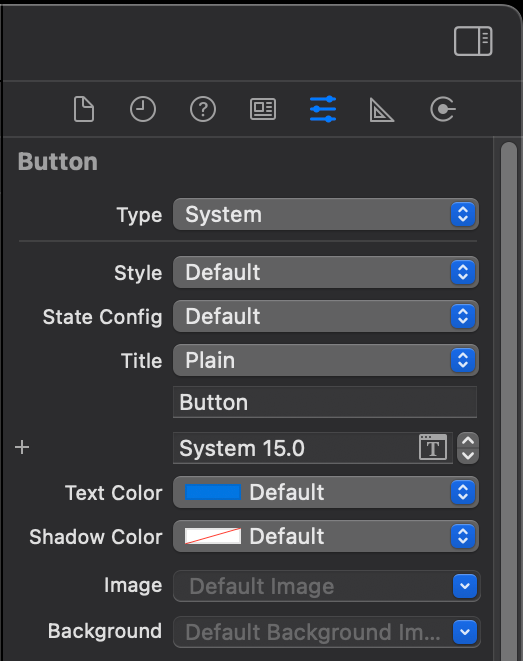

2. 타이틀 설정
defaultButton.setTitle("디폴트", for: .normal)
plainButton.configuration?.title = "플레인"
3. 타이틀 폰트 설정
defaultButton.titleLabel?.font = .systemFont(ofSize: 40)
plainButton.titleLabel?.font = .systemFont(ofSize: 40)
Plain에서는 titleLabel로는 폰트 설정이 되지 않는다.
plainButton.configuration?.attributedTitle = AttributedString(
  "플레인",
  attributes: AttributeContainer([NSAttributedString.Key.font : UIFont.systemFont(ofSize: 30)])
)
대신 위의 코드를 사용하면 설정이 가능하다.
4. 시스템 이미지 설정
let systemImage = UIImage(systemName: "star")
defaultButton.setImage(systemImage, for: .normal)
plainButton.configuration?.image = systemImage
let systemImage = UIImage(systemName: "star")?.withRenderingMode(.alwaysOriginal)
defaultButton.setImage(systemImage, for: .normal)
plainButton.configuration?.image = systemImage
렌더링 모드를 설정할 수 있다.
5. 이미지 설정
let image = UIImage(named: "slime1")
defaultButton.setImage(image, for: .normal)
plainButton.configuration?.image = image
Plain에서는 이미지의 크기가 버튼의 크기를 넘길 수 있다.
Default에서는 RenderingMode가 template이고,
Plain에서는 original이다.
let image = UIImage(named: "slime1")?.withRenderingMode(.alwaysOriginal)
defaultButton.setImage(image, for: .normal)
plainButton.configuration?.image = image
시스템 이미지와 마찬가지로 렌더링 모드를 설정할 수 있다.
6. 이미지 위치 설정 (Plain)
plainButton.configuration?.imagePlacement = .top
Plain에서는 간단하게 이미지의 위치를 조절할 수 있다.
7. 시스템 이미지 크기 설정 (Plain)
let imageConfig = UIImage.SymbolConfiguration(pointSize: 50)
plainButton.configuration?.preferredSymbolConfigurationForImage = imageConfig
'iOS' 카테고리의 다른 글
| [iOS] Result Type으로 네트워크 통신 개선해보기 (0) | 2024.08.05 |
|---|---|
| [iOS] 싱글톤 패턴 (0) | 2024.07.30 |
| [iOS] Dispatch Queue (0) | 2024.07.18 |
| [iOS] identifier를 다루는 세가지 방법 (0) | 2024.07.10 |
| [iOS] 역값 전달 - 이전 화면에 값 전달하기 (0) | 2024.07.01 |

